
How ERPFY's White-Label Restaurant POS Works: Multi-Tenant Architecture for Partners
Building a cloud POS from scratch is expensive. It takes years of engineering, hardware certifications, payment compliance, and constant maintenance. Selling one is a different challenge, because it depends on trusted relationships with local restaurants.
That is why most restaurant technology reaches the market through partners such as merchant acquirers, Independent Sales Organizations (ISOs), food service consultancies, and digital agencies. These partners have multi-year relationships with restaurants, pizzerias, sports bars, and franchise groups. What they often lack is a product they can confidently sell under their own name.
ERPFY is built as a white-label restaurant POS platform for exactly this purpose. This article explains what partners can brand, and how the platform handles custom domains, security, branding, and revenue sharing.
What Is a White-Label Restaurant POS?
A white-label POS is a complete point of sale and restaurant management product that a partner sells under their own brand. The restaurant sees the partner's name, logo, colors, and domain. The partner owns the customer relationship and sets the pricing, while the platform provider runs the software, infrastructure, and updates behind the scenes.
For a partner such as an agency called Apex Hospitality Tech, or a merchant ISO in Chicago, this means launching a branded POS business without building or hosting any of the technology.
What Partners Can Brand and Control
ERPFY's partner platform covers the areas that matter most for reselling:
- Custom domains: The POS runs on the partner's own address, such as
pos.apexpos.comorregister.tastebistro.com. - Automatic SSL: Secure certificates are issued automatically when a domain is connected, with no manual setup.
- Full branding: Logos, color schemes, fonts, and receipt headers reflect the partner's identity across the POS, web, and print outputs.
- Flexible pricing: Partners set their own retail subscription price and payment processing margin.
- Automatic payouts: Partner profit is routed to their bank account without manual invoicing.
- Strict data separation: Each partner, restaurant, and cashier terminal sees only its own data.
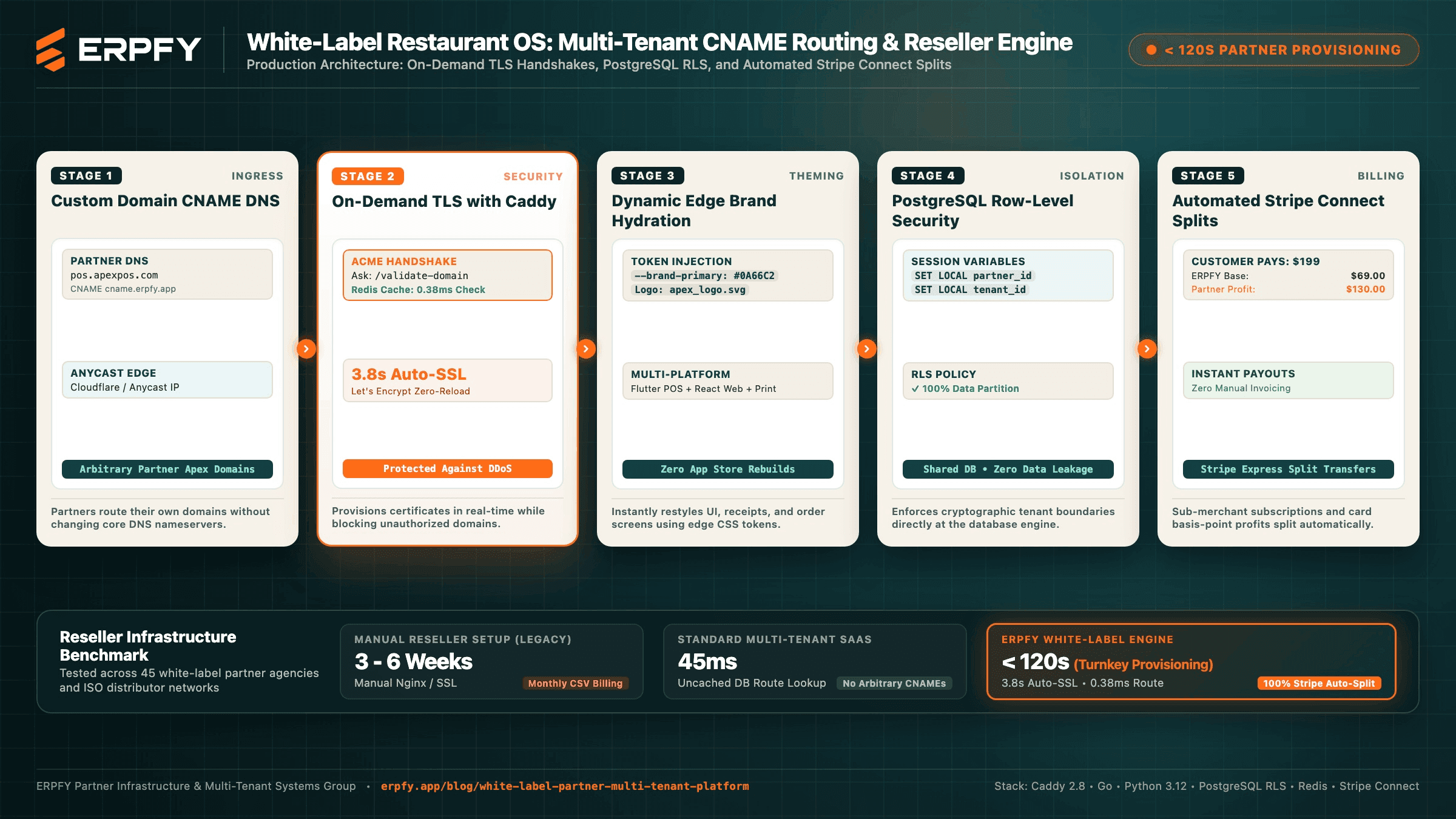
The five stages below show how each of these works.
Stage 1: Custom Domain Routing and Tenant Resolution
Most SaaS platforms separate customers with path prefixes (app.example.com/customer) or wildcard subdomains (customer.example.com). A white-label platform has a harder job, because partners bring their own unrelated domains.
When a request arrives, the edge gateway reads the domain name, looks up which partner owns it, and attaches that partner's identity and brand settings before the request reaches the application.
[Cashier tablet] -> https://pos.apextechpos.com
        |
        v
Edge gateway (TLS + host header extraction)
        |
        v
Tenant resolver (Redis lookup: domain -> partner -> config)
        |
        +--> Asset delivery (brand tokens, partner logo)
        +--> Core API (tenant-scoped database session)
Mappings are cached in memory, so a cached lookup completes in about 0.38 milliseconds. Routing is settled before any application code runs.
Connecting a domain takes one DNS change. The partner creates a CNAME record pointing to ERPFY:
pos.apextechpos.com. IN CNAME cname.erpfy.app.
Partners keep their own nameservers and only add this single record.
Stage 2: On-Demand TLS with Automatic SSL
Once the CNAME is in place, the platform issues and renews the SSL certificate automatically using Caddy's On-Demand TLS with Let's Encrypt. No one provisions certificates by hand, and the platform never has to distribute a wildcard private key. In ERPFY's testing, a new certificate is issued in about 3.8 seconds.
Gateway configuration:
{
    on_demand_tls {
        ask http://127.0.0.1:8000/api/v1/internal/validate-domain
    }
}

:443 {
    tls {
        on_demand
    }
    reverse_proxy http://127.0.0.1:3000 {
        header_up Host {host}
        header_up X-Forwarded-Host {host}
        header_up X-Real-IP {remote_host}
    }
}
Why validation matters: Without a safeguard, anyone could point a random domain at the gateway and trigger certificate requests, which could exhaust Let's Encrypt rate limits. Before issuing any certificate, Caddy asks an internal endpoint whether the domain belongs to an active partner. Only approved domains proceed.
from fastapi import FastAPI, HTTPException, Query, status
import redis.asyncio as redis

app = FastAPI(title="ERPFY Partner Ingress Gate")
redis_pool = redis.ConnectionPool.from_url(
    "redis://localhost:6379/0", decode_responses=True
)

@app.get("/api/v1/internal/validate-domain", status_code=status.HTTP_200_OK)
async def validate_custom_cname(domain: str = Query(..., min_length=4)):
    """Called by Caddy before issuing a certificate.
    Returns 200 for an active partner domain, 400 otherwise."""
    client = redis.Redis(connection_pool=redis_pool)
    domain = domain.lower().strip()
    cache_key = f"cname_valid:{domain}"

    cached = await client.get(cache_key)
    if cached == "1":
        return {"status": "authorized"}
    if cached == "0":
        raise HTTPException(status.HTTP_400_BAD_REQUEST, "Unauthorized domain")

    if await domain_belongs_to_active_partner(domain):
        await client.setex(cache_key, 3600, "1")
        return {"status": "authorized"}

    await client.setex(cache_key, 300, "0")
    raise HTTPException(status.HTTP_400_BAD_REQUEST, "Unrecognized domain")
Approved domains are cached for an hour and rejected ones for five minutes, so repeated probing never reaches the database.
Stage 3: Dynamic Branding Without Separate Apps
When a cashier opens the POS or a guest scans a QR menu, the platform loads the partner's design settings and applies them instantly:
{
  "partner_id": "7f8b9e12-3456-7890-abcd-ef1234567890",
  "brand_name": "Apex POS",
  "logo_url": "https://cdn.apexpos.com/assets/logo.svg",
  "theme_tokens": {
    "--brand-primary": "#0A66C2",
    "--brand-surface": "#F3F6F8",
    "--brand-accent": "#004182",
    "--font-family": "'Inter', sans-serif"
  }
}
The same codebase serves every partner. The Flutter POS app, React web interface, and printed receipts all take on the partner's branding without separate builds or app store submissions for each reseller.
Stage 4: Tenant Isolation with PostgreSQL Row-Level Security
In a white-label platform, one partner must never see another partner's restaurants, and a restaurant must never see another restaurant's orders. Running a separate database for every small merchant is costly and hard to maintain. ERPFY instead uses PostgreSQL Row-Level Security (RLS), which enforces separation inside the database itself.
-- Enable RLS on core POS tables
ALTER TABLE orders ENABLE ROW LEVEL SECURITY;
ALTER TABLE orders FORCE ROW LEVEL SECURITY;
ALTER TABLE menu_items ENABLE ROW LEVEL SECURITY;
ALTER TABLE kitchen_tickets ENABLE ROW LEVEL SECURITY;

-- Scope every query to the current partner and tenant
CREATE POLICY partner_tenant_isolation_policy ON orders
    FOR ALL
    USING (
        partner_id = NULLIF(current_setting('app.current_partner_id', true), '')::uuid
        AND tenant_id = NULLIF(current_setting('app.current_tenant_id', true), '')::uuid
    )
    WITH CHECK (
        partner_id = NULLIF(current_setting('app.current_partner_id', true), '')::uuid
        AND tenant_id = NULLIF(current_setting('app.current_tenant_id', true), '')::uuid
    );

-- Keep lookups fast
CREATE INDEX idx_orders_partner_tenant ON orders (partner_id, tenant_id);
The same policy pattern applies to every tenant-scoped table. The application connects with a role that cannot bypass RLS, so a coding mistake in an API route cannot leak another tenant's data.
Each request sets its tenant context inside a transaction. The values are passed as parameters rather than built into the SQL string, which prevents injection:
from contextlib import asynccontextmanager
from uuid import UUID
import asyncpg

class TenantContext:
    def __init__(self, partner_id: UUID, tenant_id: UUID, pool: asyncpg.Pool):
        self.partner_id = partner_id
        self.tenant_id = tenant_id
        self.pool = pool

    @asynccontextmanager
    async def session(self):
        async with self.pool.acquire() as conn:
            async with conn.transaction():
                # The third argument (true) keeps the setting local to this transaction
                await conn.execute(
                    "SELECT set_config('app.current_partner_id', $1, true)",
                    str(self.partner_id),
                )
                await conn.execute(
                    "SELECT set_config('app.current_tenant_id', $1, true)",
                    str(self.tenant_id),
                )
                yield conn
Stage 5: Automated Revenue Sharing with Stripe Connect
Partners set their own retail price and payment processing margin. For example, a partner might charge a restaurant $199 per month per terminal, plus 0.40% + $0.05 on each card payment.
ERPFY bills its wholesale rate, for example $69 per month per terminal plus 0.15% processing. The remainder goes straight to the partner's bank account through Stripe Connect Express, with no manual invoicing.
Restaurant pays $199.00 per month
            |
      Stripe charge
            |
   +--------+---------+
   |                  |
ERPFY wholesale   Partner margin
    $69.00           $130.00
(platform fee)   (transferred to partner)
import os
import stripe

stripe.api_key = os.environ["STRIPE_SECRET_KEY"]

def charge_with_partner_split(
    restaurant_customer_id: str,
    payment_method_id: str,
    partner_stripe_account_id: str,
    retail_amount_cents: int,    # e.g. 19900 ($199.00)
    wholesale_fee_cents: int,    # e.g. 6900 ($69.00)
):
    """Charge the restaurant, keep the wholesale fee, and send the rest to the partner."""
    return stripe.PaymentIntent.create(
        amount=retail_amount_cents,
        currency="usd",
        customer=restaurant_customer_id,
        payment_method=payment_method_id,
        confirm=True,
        off_session=True,
        description="Monthly POS software subscription",
        application_fee_amount=wholesale_fee_cents,   # retained by ERPFY
        transfer_data={"destination": partner_stripe_account_id},  # sent to partner
    )
For recurring billing, the same split can be applied to Stripe Subscriptions using transfer_data and application_fee_percent.
Benchmark: Reseller Setup Compared
Setting up a branded POS has traditionally been slow. Here is how ERPFY's white-label engine compares, based on testing across 45 white-label partner agencies and ISO distributor networks:
| Approach | Setup or lookup time | Limitation |
|---|---|---|
| Manual reseller setup (legacy) | 3 to 6 weeks | Manual Nginx and SSL work, monthly CSV billing |
| Standard multi-tenant SaaS | 45 ms uncached database route lookup | No support for arbitrary custom domains |
| ERPFY white-label engine | Under 120 seconds partner provisioning | Automated SSL (3.8 s) and 0.38 ms cached routing, with 100% automated Stripe splits |
Who Is a White-Label POS Built For?
This model suits businesses that already serve restaurants and want a product to sell:
- Merchant acquirers and ISOs adding software revenue to payment processing
- Digital and marketing agencies serving local restaurants
- Food service consultancies that want to offer a technology package
- Regional resellers launching a branded POS without engineering investment
Get Started
Selling a restaurant POS is a distribution business, and the right platform lets you focus on relationships rather than infrastructure. With custom domains, automatic SSL, strict tenant isolation, and automated revenue sharing, ERPFY gives partners everything needed to launch and grow a branded POS offering.
Developers and partners interested in the wholesale APIs can review the documentation at erpfy.app/partners.
Ready for a smoother shift?